You need subtitles cleaned up and reusable
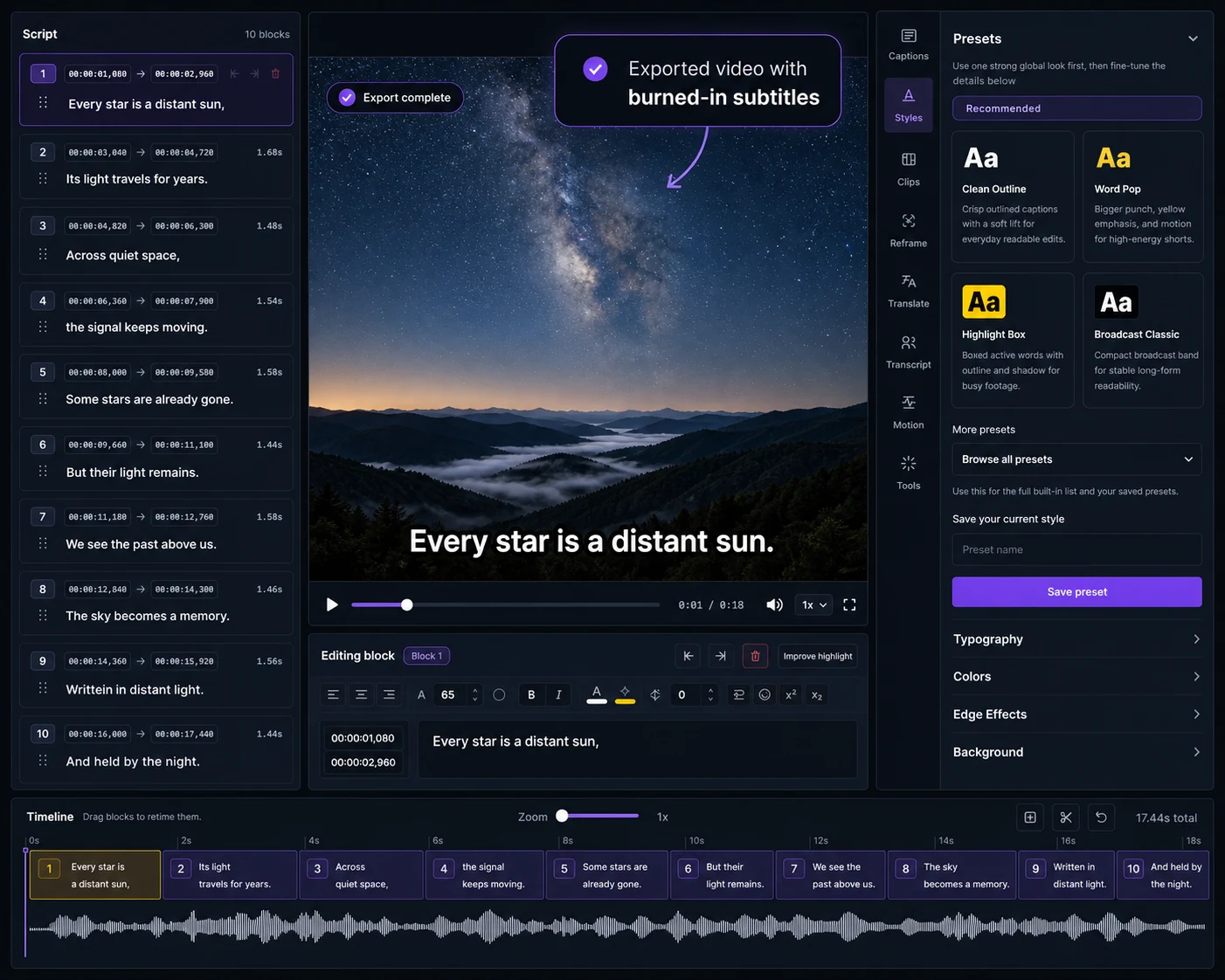
Choose Captn when you need to review caption text, check timing, export SRT/VTT files, or create a captioned MP4 without working through a full creative editing surface.
 Captn
Captn
CAPCUT ALTERNATIVE FOR SUBTITLE EXPORTS
Use CapCut when you need social-first video editing. Use Captn when the subtitle layer needs cleanup, timing checks, reusable SRT/VTT files, translation or a captioned MP4 export.
Quick answer
CapCut is useful when captions are part of a larger short-form edit. Captn is useful when subtitles need to be reviewed, reused and exported clearly after the video is decided.
Choose Captn when you need to review caption text, check timing, export SRT/VTT files, or create a captioned MP4 without working through a full creative editing surface.
Choose CapCut when the job is a social video edit with templates, transitions, effects, overlays and platform-specific creative tools.
Captn vs CapCut
CapCut and Captn can both support caption work, but the workflow intent is different: social video editing versus subtitle cleanup, export, and reuse.
| Workflow need | Captn | CapCut |
|---|---|---|
| Primary job | Finish auto subtitles, imported captions, timing, styling, translation, SRT/VTT, and captioned MP4 exports. | Build social videos where captions are one layer inside a broader creative editor. |
| Auto subtitles | Generate editable subtitles from speech, then review wording, line breaks, and block timing before export. | Auto captions are available across CapCut surfaces, with capability varying by platform and version. |
| SRT/VTT files | Treat SRT and VTT import/export as core subtitle deliverables for reuse, upload, archive, or translation. | Caption file options vary by CapCut surface; public help references SRT/TXT export behavior and constraints. |
| Subtitle timing | Use a subtitle editor workflow for timing checks, split/merge cleanup, and preview before final download. | Timing edits happen inside a larger video timeline designed for creative edits and social publishing. |
| Translate subtitles | Translate subtitle versions as part of the caption cleanup and export workflow. | Bilingual and translated caption features are useful when you are still working inside CapCut's edit. |
| Burn subtitles into video | Export a captioned MP4 when subtitles need to stay visible on every platform or player. | Useful when the final social edit and its visual caption style are already being produced in CapCut. |
| Full-editor overhead | Keep the workflow focused on subtitles instead of opening templates, layers, effects, and creative tools. | Better when the video itself still needs social-first editing and creative iteration. |
| Best fit | Creators and teams who need reusable subtitle files, captioned MP4s, and careful subtitle cleanup. | Creators who need CapCut's social editing surface and platform-ready creative effects. |
Subtitle-first workflow
A social edit often ends at the exported video. Subtitle work often needs more: a captioned MP4, separate SRT/VTT files, clean timing and text that can be reused later.
Fix wording, line breaks, block splits and timing before the subtitles become part of the final export.
Export SRT or VTT files when the same subtitles need to be uploaded, archived, translated or reused.
Create a captioned MP4 when the platform or audience needs subtitles visible without a separate file.
When to use which
The video edit is mostly done and you need subtitle cleanup, styling, translated versions, reusable files or a captioned MP4.
You are still building the video with social-first creative tools, effects, music, templates and platform-ready short-form edits.
Concrete examples
These examples focus on when a subtitle-first workflow is more direct than reopening a full social editor.
Use Captn when the video is already edited but the same captions need to leave as SRT/VTT for YouTube, a course page, or an archive.
Generate or import captions, correct guest names and line breaks, then export a captioned MP4 without changing the creative edit.
Create a translated subtitle version, preview it on the video, and export files or a burned-in captioned MP4.
Trust fit
Captn is built for subtitle-first video workflows. Use it when subtitles are a real deliverable with timing, styling, translation, SRT/VTT and captioned MP4 export, not when the whole short-form edit is still changing.
Captn is built for subtitle-first video workflows where caption cleanup, timing, styling, translation, reusable files and captioned MP4 export are the job.
Stay in CapCut when the main work is templates, transitions, music, stickers, overlays, or short-form pacing.
Captn is a browser subtitle editor, so it is not the best fit for mobile-first creative editing sessions.
If captions are just one visual layer inside a larger CapCut project, finish the full edit there first.
Export angle
Captn is useful when subtitles need to leave the editor as practical outputs, not only as text inside one social video project.
Keep subtitle files for upload workflows, future edits, translations and platform caption tracks.
Export a project video where subtitles travel with the video as visible captions.
Keep transcript, timing and styling decisions together so the caption layer stays useful after export.
FAQ
Quick answers for creators comparing CapCut with a subtitle-first video workflow.
CapCut is a broader social video editor. Captn is built for subtitle-first video workflows with subtitle cleanup, timing, translation, SRT/VTT export and captioned MP4 delivery after the video direction is already clear.
Use Captn when subtitles are the deliverable: a cleaned SRT or VTT file, a translated caption track, or a captioned MP4 with subtitles burned into the video.
Yes. Upload a video, generate auto subtitles, then edit the transcript, fix subtitle blocks, adjust timing, style captions, and export the result.
Yes. Captn exports SRT and VTT files so subtitles can be reused on YouTube, course platforms, web players, editing tools, or later translation workflows.
Yes. Captn can export a captioned MP4 with styled subtitles rendered directly into the video file.
Yes. Captn supports subtitle translation so you can create translated subtitle versions before downloading files or a captioned video.
No. If you need CapCut's social templates, mobile-first editor, transitions, music, overlays, or broader creative effects, CapCut is the better workspace.
Yes. You can start free and test subtitle generation, editing, styling, and export. Free upload and export limits apply.

Start a project