Choose Captn if subtitles are the main deliverable
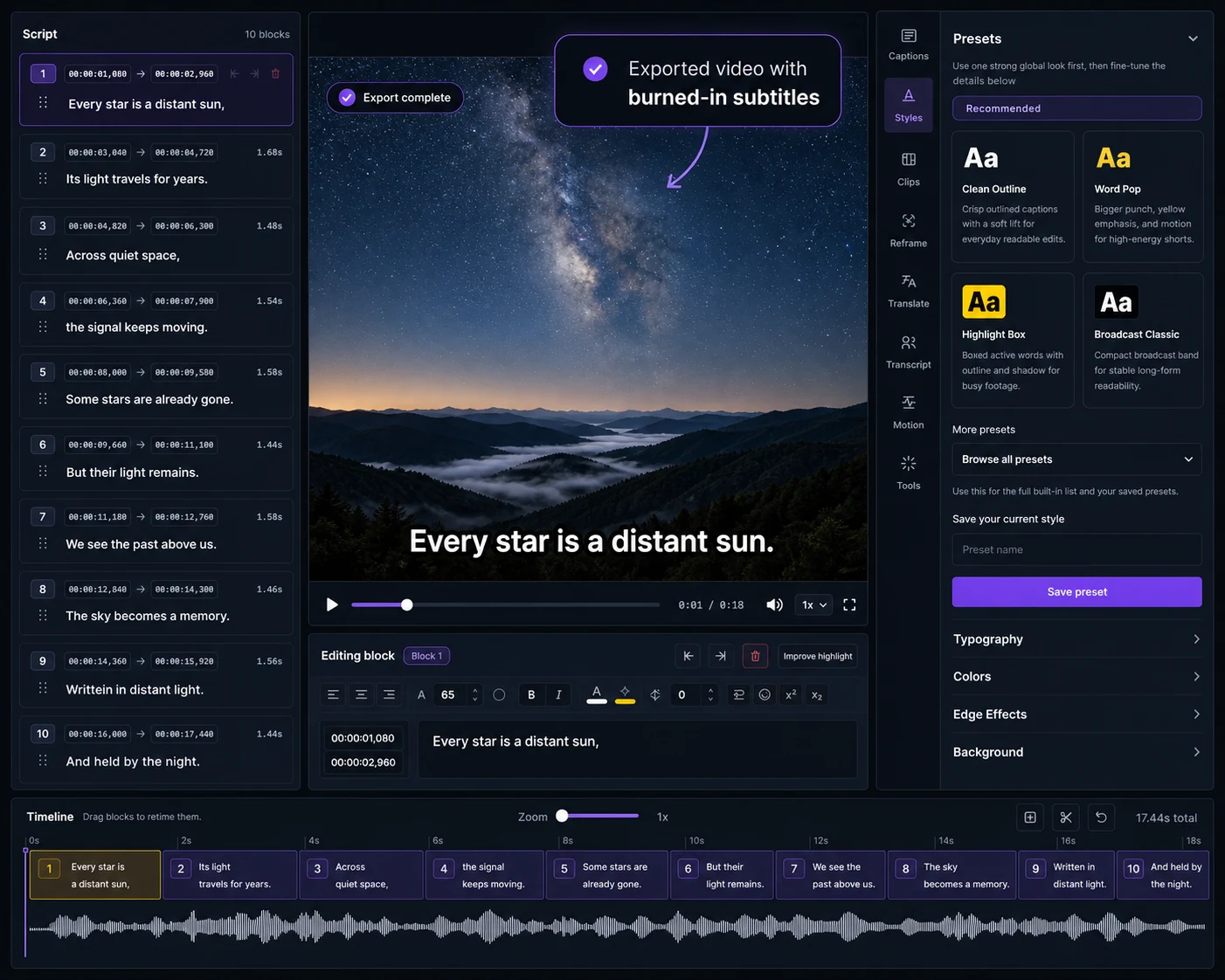
Choose Captn when you need to generate or import captions, fix the transcript, adjust timing, style the subtitle layer, translate versions and export SRT/VTT or a captioned MP4.
 Captn
Captn
VEED ALTERNATIVE FOR SUBTITLE WORKFLOW
Captn is for creators who need a subtitle-first video workflow to generate, clean up, style, translate and export captions without burying the job inside a full studio editor.
Quick answer
VEED is a broad online editor with subtitle tools. Captn keeps the project centered on subtitle cleanup and export when captions are the primary deliverable.
Choose Captn when you need to generate or import captions, fix the transcript, adjust timing, style the subtitle layer, translate versions and export SRT/VTT or a captioned MP4.
Choose VEED when captions are one step inside a larger online video project with recording, layout, brand, AI video tools and general editing needs.
Captn vs VEED
Captn and VEED both support subtitle work. This comparison focuses on whether the project is centered on caption delivery or a broader editing workflow.
| Workflow need | Captn | VEED |
|---|---|---|
| Workflow scope | Focused subtitle workflow for auto subtitles, import, cleanup, timing, styling, translation, and export. | Broad online video editor where subtitles sit alongside recording, layout, brand, and AI video tools. |
| Auto subtitles | Generate editable subtitles, then review the caption layer closely before downloading files or video. | VEED supports subtitle generation inside a broader editor and social video workflow. |
| SRT/VTT import | Import SRT or VTT files and keep the workflow focused on timing, styling, translation, and export. | VEED supports SRT/VTT subtitle upload in its editor workflow. |
| SRT/VTT export | Export SRT and VTT files as core deliverables for platforms, web players, courses, and archives. | VEED offers subtitle file downloads such as SRT, VTT, or TXT as part of its subtitle tools. |
| Subtitle timing | Adjust blocks, line breaks, timing, placement, and readability in a subtitle-first editor. | Timing edits happen inside a larger online video editing surface. |
| Translate subtitles | Translate subtitle versions before exporting files or a captioned MP4. | VEED includes subtitle translation in a broader video creation workflow. |
| Burn subtitles into video | Export a captioned MP4 with styled subtitles rendered into the video. | VEED can hardcode subtitles or download separate subtitle files depending on the workflow. |
| Best fit | Creators who want a subtitle-first video workflow when subtitles are the main deliverable. | Creators who want one broad online editor for the whole video project. |
Subtitle-first workflow
When the final deliverable is captions, the useful work is not just generating text. It is reviewing timing, fixing mistakes, styling, translating, and exporting the right format.
Start from speech-to-subtitles, SRT or VTT instead of losing your project in a general editing flow.
Check subtitle blocks, timing, placement, wrapping, and styling before captions leave the editor.
Export SRT/VTT for platform upload, burn in captioned MP4s or create reusable caption assets.
When to use which
The important deliverable is a corrected caption track, reusable subtitle files or a branded subtitle layer on a captioned MP4.
The project needs a wider online editor for recording, templates, layout, branding, AI video tools and general production.
Concrete examples
These examples separate general video production from focused subtitle cleanup and delivery.
Use Captn to fix generated caption text, line breaks and timing before downloading files or captioned MP4.
Review captions with the video, export WebVTT, and keep a captioned MP4 option for other channels.
Style captions for phone screens, burn them into MP4 and keep SRT/VTT files for reuse.
Trust fit
VEED is a broader online video editor with its own subtitle tools. Captn is best when subtitle cleanup, reusable files, translation and export are the priority.
Captn is built for subtitle-first video workflows where captions, timing, styling, translation, reusable files and export are the priority.
Use VEED when the project also needs recording, layout, templates, brand tools, AI video tools, or broader editing.
If subtitles are only one layer in a larger VEED project, finish the full video there before moving into a dedicated subtitle-first workflow.
Captn is not a replacement for a broad workspace, asset library, or team production process.
Export angle
Captn keeps the final step focused on caption deliverables, so export choices stay close to the subtitle work itself.
Export SRT or VTT for platforms that manage captions separately.
Export an MP4 with styled subtitles rendered into the video.
Use translation as its own subtitle workflow before downloading files or video.
FAQ
Quick answers for creators comparing VEED with a subtitle-first Captn workflow.
VEED is a broad online video editor. Captn is built for subtitle-first video workflows with auto subtitles, SRT/VTT import, timing cleanup, styling, translation and captioned MP4 export.
Choose Captn when subtitles are the main deliverable: caption files, timing cleanup, translated subtitle versions, or a captioned MP4 that does not need a broad editor workflow.
Yes. Captn can generate auto subtitles from speech, then let you edit the transcript, split or merge blocks, fix timing, and style captions.
Yes. Captn can import SRT and VTT files, then let you edit, sync, style, translate, and export them.
Yes. Captn exports SRT and VTT files for platform uploads, web players, learning tools, archives, and later edits.
Yes. Captn can export a captioned MP4 with subtitles rendered into the video so captions stay visible everywhere.
Yes. Captn supports subtitle translation before you download subtitle files or a captioned video.
Yes, when captions are the priority. Captn keeps caption text, timing, styling, translation, and export close together instead of making subtitles one step inside a broad editor.
Start a project