Choose Captn if captions are the thing you need to finish
Choose Captn when you need to generate or import subtitles, clean them up, style them, translate versions, export files or captioned MP4s from one focused subtitle-first workflow.
 Captn
Captn
KAPWING ALTERNATIVE FOR SUBTITLE-FIRST VIDEO WORKFLOW
Kapwing is a content creation workspace. Captn is built for subtitle-first video workflows where the subtitle layer, reusable files, clips, translations and captioned video are the actual deliverables.
Quick answer
Use Captn when captions, captioned video or reusable subtitle files are the deliverable. Use Kapwing when the whole project needs a broader creative workspace.
Choose Captn when you need to generate or import subtitles, clean them up, style them, translate versions, export files or captioned MP4s from one focused subtitle-first workflow.
Choose Kapwing when you want browser-based content creation with templates, brand assets, team workflows, layout tools and a broader production process.
Captn vs Kapwing
Kapwing can be useful when subtitles are part of a broader content workflow. Captn stays centered on subtitle delivery when the real job is caption outputs.
| Workflow need | Captn | Kapwing |
|---|---|---|
| Workflow focus | Subtitle generation, SRT/VTT import, cleanup, timing, styling, translation, and export. | Online content creation workspace with subtitles inside a broader video editor. |
| Auto subtitles | Generate auto subtitles, then keep the subtitle editor focused on the caption layer until export. | Kapwing offers AI subtitle generation inside its wider editor and content creation workflow. |
| SRT/VTT import | Import SRT or VTT, sync it to video, style it, translate subtitles, and export clean deliverables. | Kapwing supports uploading SRT/VTT files into its subtitle workflow. |
| SRT/VTT export | Export SRT and VTT as focused subtitle outputs, alongside captioned MP4 export. | Kapwing supports subtitle file downloads such as SRT/VTT/TXT within its broader workspace. |
| Subtitle timing | Review and fix subtitle blocks against playback when timing accuracy is the main concern. | Timing controls are available as part of the full video editor. |
| Burn subtitles into video | Export a captioned MP4 when subtitles must stay visible everywhere. | Kapwing can burn captions into video as part of its project export workflow. |
| Project overhead | Keep the workflow centered on subtitle timing, styling, translation and export when the deliverable is a subtitle file, captioned MP4 or both. | More useful when the project also needs templates, layout, assets, team work, and general editing. |
| Best fit | Creators who want a subtitle-first video workflow from subtitle draft to finished caption deliverables. | Teams and creators managing broader online content production. |
Subtitle-first workflow
If the video is already known and the work is subtitles, a focused subtitle-first workflow can be more direct than opening a full content creation workspace.
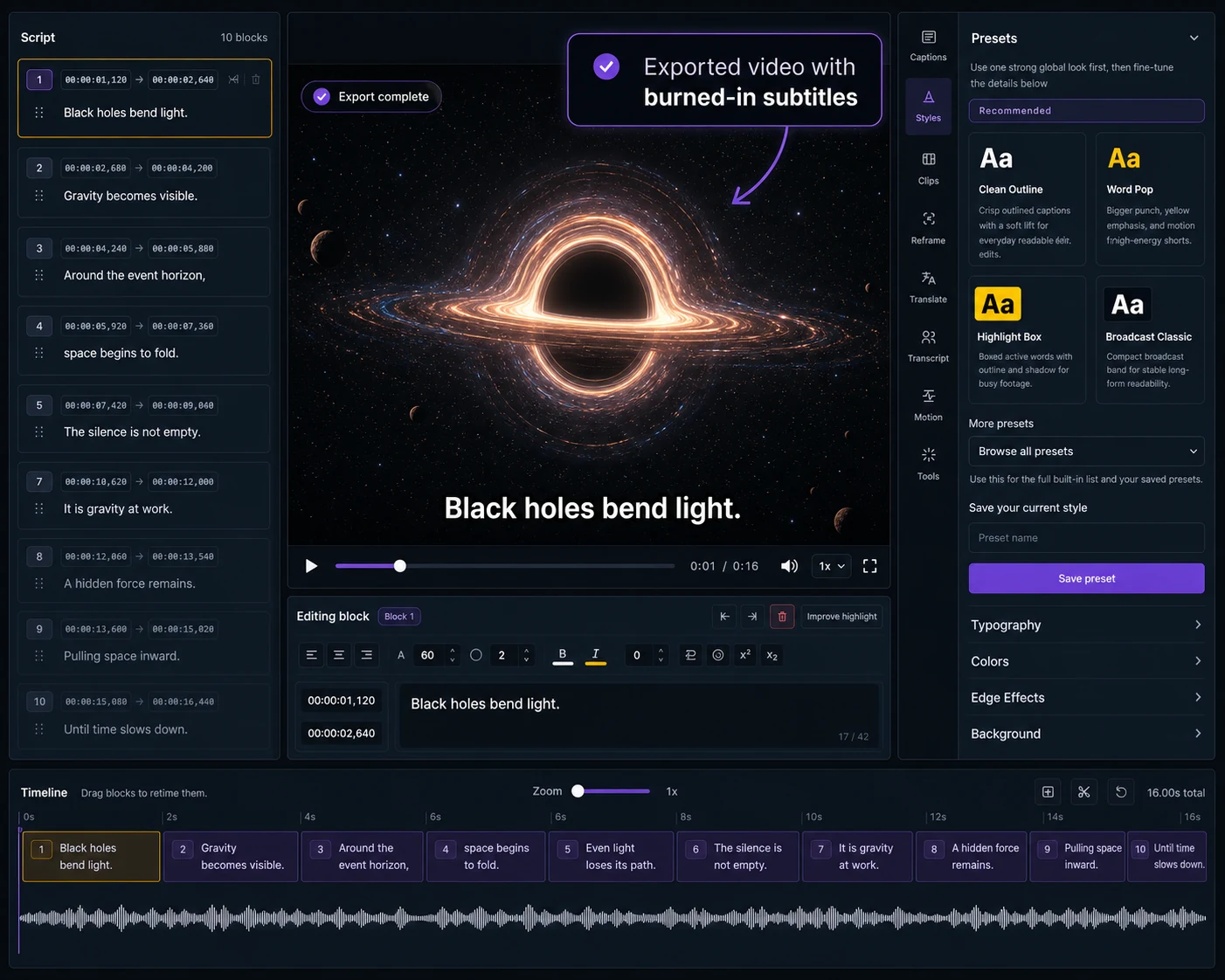
Generate subtitles from video, import an existing caption file or start with a transcript.
Fix text, timing, line breaks, readability, and style while previewing the video.
Download SRT/VTT or render a captioned MP4 when captions need to be ready to publish.
When to use which
The main output is subtitles: a cleaned caption track, a reusable SRT/VTT file, or a video with readable captions burned in.
The main output is a broader content piece that needs templates, assets, layout, brand work, collaboration and video editing beyond captions.
Concrete examples
These examples are for cases where caption deliverables matter more than broad content workspace features.
Use Captn when a lecture or training video needs reviewed VTT captions plus a captioned MP4 for sharing.
Clean text, tune placement and export the captioned video without opening layout templates or asset tools.
Export SRT, VTT and burned-in MP4 from one subtitle-first project instead of rebuilding captions per format.
Trust fit
Kapwing already has capable subtitle tools inside a broader content workspace. Captn is best when the subtitle layer, reusable files and captioned video are the actual deliverables.
Captn is built for subtitle-first video workflows: subtitle generation, import, cleanup, visual styling, translation, reusable files and captioned MP4 export.
Use Kapwing when the same project needs layouts, templates, assets, resizing, collaboration, and editing beyond captions.
If captions are part of a bigger visual composition, keep that work in the broader editor.
Captn keeps subtitle work focused, but it is not a team content workspace or asset pipeline.
Export angle
Captn keeps export choices tied to the subtitle job, so the final decision is simple: caption file, captioned MP4, or both.
Render subtitles into the video when captions must travel with the file.
Export clean caption tracks for platforms, learning tools, web players, and archives.
Adjust subtitle readability and visual style before exporting the final deliverable.
FAQ
Quick answers for creators comparing Kapwing with a subtitle-first video workflow.
No. Kapwing is a broader content creation workspace. Captn is focused on subtitle generation, SRT/VTT import, timing cleanup, styling, translation, and caption export.
Use Captn when captions are the deliverable: cleaned subtitles, reusable SRT/VTT files, translated subtitle versions, or a captioned MP4.
Yes. Captn can generate auto subtitles from a video, then let you edit the text, timing, line breaks, and visual style.
Yes. Captn can import SRT and VTT files, then let you sync, edit, style, translate subtitles, and export them.
Yes. Captn exports SRT and VTT files as standalone caption deliverables for platforms, web players, courses, archives, and downstream tools.
Yes. Captn can render subtitles into a captioned MP4 when the captions need to travel with the video file.
No. If the work needs templates, design layouts, team assets, resizing, or broader content production, Kapwing is the better fit.
Yes. You can start free and test the caption workflow before deciding whether you need a broader content workspace. Free upload and export limits apply.

Start a project