Subtitles need to become part of the final video
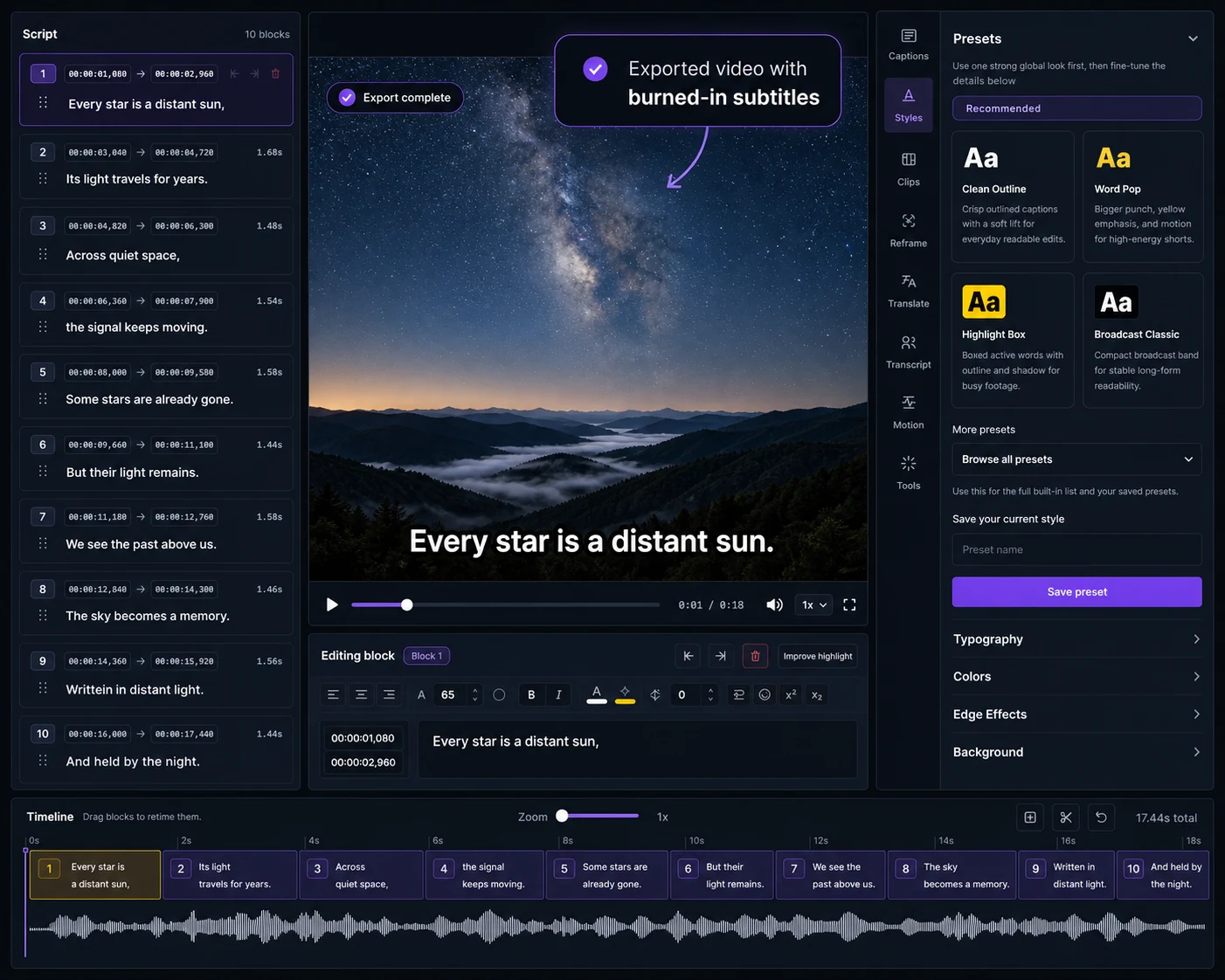
Choose Captn when you need to place subtitles on the video, review timing, style captions, translate versions and export a ready-to-share MP4 or subtitle files.
 Captn
Captn
HAPPY SCRIBE ALTERNATIVE FOR VIDEO SUBTITLES
Use Happy Scribe when the main job is transcription or subtitle service delivery. Use Captn when subtitles need to be reviewed in video, styled, translated and delivered as reusable files or captioned video.
Quick answer
Happy Scribe is useful for producing transcripts or subtitle files. Captn is useful when those subtitles need to be checked in the video, styled, exported and reused.
Choose Captn when you need to place subtitles on the video, review timing, style captions, translate versions and export a ready-to-share MP4 or subtitle files.
Choose Happy Scribe when the main deliverable is transcription, subtitle generation, language service or file-based transcription workflow.
Captn vs Happy Scribe
Happy Scribe is service-oriented around transcripts and subtitle files. Captn is editor-oriented around turning subtitles into reviewed video assets.
| Workflow need | Captn | Happy Scribe |
|---|---|---|
| Starting point | A video or SRT/VTT file that needs hands-on subtitle review, styling, translation, and export. | A transcription or subtitle service workflow where text and files are often the main deliverables. |
| Auto subtitles | Generate auto subtitles from video, then inspect timing and readability inside the video editor. | Create subtitles through automatic or human-made service workflows. |
| Import SRT/VTT | Import SRT or VTT, sync against video, style, translate, and export cleaned files or captioned MP4. | Happy Scribe supports importing SRT/VTT into its subtitle editor and translating those subtitles. |
| Export formats | Focus on SRT, VTT, and captioned MP4 outputs for video publishing and reuse. | Offers broader subtitle/transcript export options, with some formats depending on plan and service type. |
| Video preview | Review placement, line breaks, timing, and style against the actual video before export. | Useful for subtitle review, while the overall workflow is still service and file-delivery oriented. |
| Burn subtitles into video | Create a captioned MP4 where the subtitle layer is visible without separate caption files. | Can export video with subtitles as part of its subtitle delivery workflow. |
| Translate subtitles | Translate subtitles as part of the final visual review and export step. | Translation is useful when your primary workflow is language service delivery. |
| Best fit | Creators turning a subtitle file or video into a publishable captioned video asset. | Teams producing transcripts, subtitles, translations, and service-managed file deliverables. |
Subtitle-first workflow
A subtitle file is not always the end of the job. Sometimes the file needs to become a clean visual layer in the final video.
Bring in SRT or VTT files and check them against the actual video before publishing.
Choose readable caption placement, outlines, backgrounds and highlights before rendering.
Create a captioned MP4 or subtitle files ready for upload, delivery and reuse.
When to use which
You have subtitles or a video and need to sync, review, style, translate and export a finished captioned video or cleaned subtitle files.
Your main need is transcription, subtitle generation, translation service workflows, or producing transcript/subtitle files at scale.
Concrete examples
These examples are for hands-on video publishing after a transcript or subtitle file exists.
Import SRT/VTT, watch the captions against the video, fix drift or awkward breaks, then export the cleaned file.
Use Captn when the real output is a captioned MP4 or social clip, not only a document-style transcript.
Preview translated subtitles on the video before burning them into MP4 or downloading files.
Trust fit
Captn is a hands-on subtitle-first video workflow. It is not a transcription service, subtitle service, or large-scale language delivery workflow.
Captn is built for subtitle-first video workflows where subtitles need timing review, styling, translation, reusable files and captioned MP4 export inside the video project.
Use Happy Scribe when the primary deliverable is a transcript, subtitle service, or managed language output.
Happy Scribe is stronger when the job is broad file delivery across transcript and subtitle formats.
If you want a service-led transcription or subtitling path rather than a hands-on subtitle-first video workflow, Captn is not the right first step.
Export angle
Captn is strongest when subtitles need to be checked inside the video and exported as assets that are ready to publish.
Burn subtitles into the video after checking timing, readability and placement.
Export reviewed subtitle files with fixed text, timing and line breaks.
Use subtitle translation as part of the visual review and export workflow.
FAQ
Quick answers for teams comparing Happy Scribe service workflows with Captn subtitle-first video workflows.
Happy Scribe is a transcription and subtitle service workflow. Captn is built for subtitle-first video workflows that need timing review, styling, translation, SRT/VTT and captioned MP4 export.
Use Captn when you already have a video or subtitle file and need to review captions inside the video, fix timing, style subtitles, translate, and export publish-ready assets.
Yes. Captn can import SRT and VTT files, then let you fix timing, edit text, style captions, translate, and export new files or a captioned video.
Yes. Captn can generate auto subtitles from speech, then keep the project in an editable subtitle workflow.
Yes. Captn can export an MP4 with subtitles rendered directly into the video so captions stay visible after upload.
Yes. Captn exports SRT and VTT files for platforms, web players, learning tools, archives, and downstream editing workflows.
Yes. Captn supports subtitle translation as part of the editing and export workflow.
Yes. You can start free and test the workflow. Free upload and export limits apply.

Start a project