The media edit is done and captions need finishing
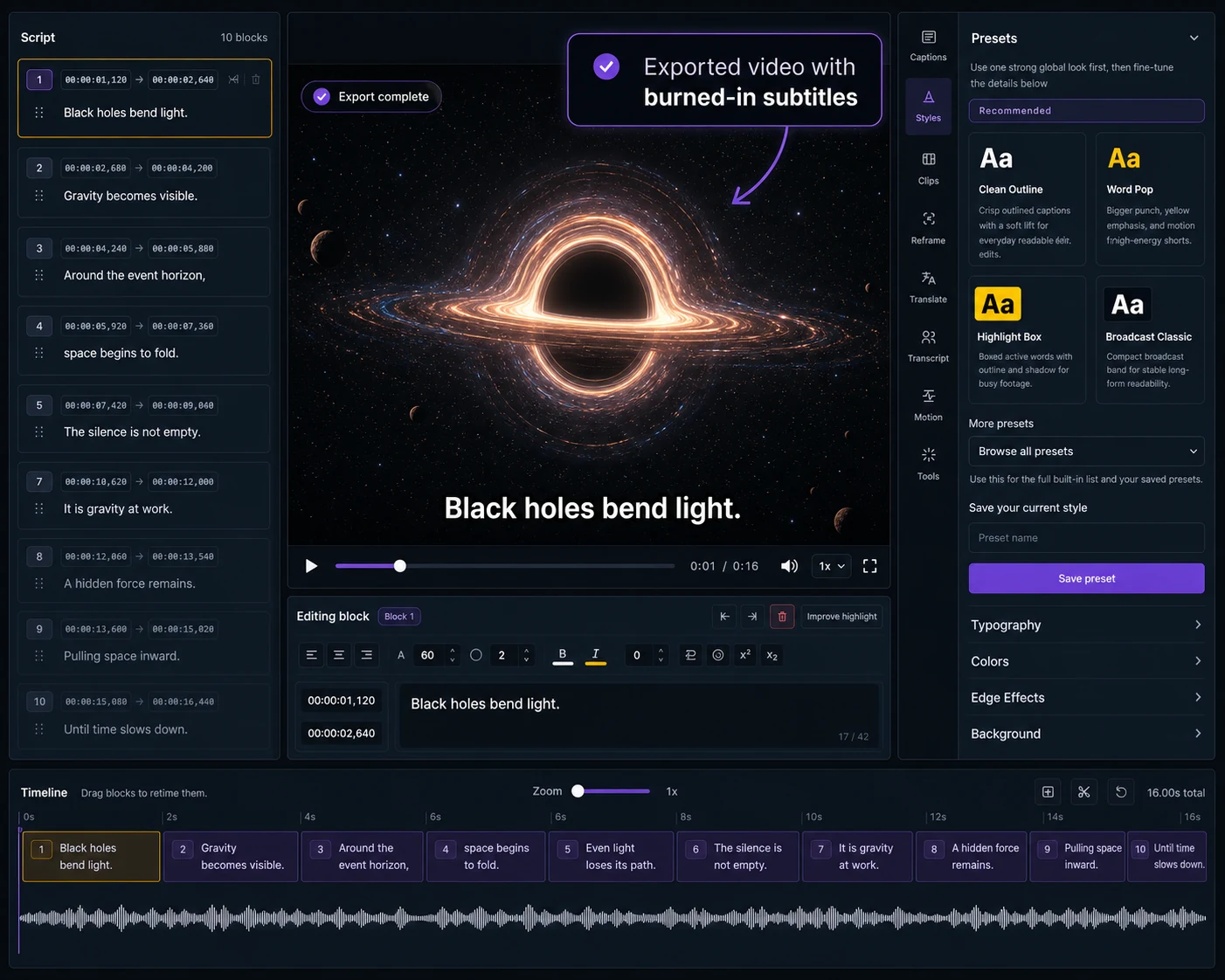
Choose Captn when your video is ready and the remaining work is subtitle timing, text cleanup, translation, styling and export to SRT/VTT or a burned-in MP4.
 Captn
Captn
DESCRIPT ALTERNATIVE FOR SUBTITLE EXPORTS
Use Descript when you want to edit the media through a transcript. Use Captn when the video is already decided and you need a subtitle-first video workflow for timing, styling, translation, reusable files and captioned MP4 export.
Quick answer
Descript is strongest when transcript editing changes the media itself. Captn is for the later stage where captions need to look right and export correctly.
Choose Captn when your video is ready and the remaining work is subtitle timing, text cleanup, translation, styling and export to SRT/VTT or a burned-in MP4.
Choose Descript when the transcript is the main editing interface for podcasts, recordings, narration, screen content or broader audio/video production.
Captn vs Descript
Descript and Captn both touch transcripts and subtitles. The difference is whether the transcript drives the media edit or the subtitle layer is being finished for export.
| Workflow need | Captn | Descript |
|---|---|---|
| Editing model | Subtitle-first video workflow for finished or near-finished videos, with timing, style, translation, reusable files and export controls. | Transcript-based media editor where text edits can drive audio and video production changes. |
| Auto subtitles | Generate subtitles from speech or import SRT/VTT, then clean the caption layer against video preview. | Captions can be generated from the project script inside a broader transcript editing workflow. |
| SRT/VTT export | Export SRT and VTT as core subtitle deliverables alongside a captioned MP4 option. | Descript supports subtitle file export settings such as SRT/VTT, speakers, line length, and card lines. |
| Caption layers | Keep styling decisions tied to the subtitle-first delivery workflow and visible video preview. | Caption layers are part of Descript's scene, script, and media editing model. |
| Burned-in captions | Render styled subtitles into a captioned MP4 when viewers should always see captions. | Descript distinguishes subtitle files, caption layers, and embedded subtitle behavior in video exports. |
| Subtitle timing | Review subtitle blocks, split or merge captions, and adjust timing after the video edit is decided. | Timing follows the transcript/media production workflow and the current composition. |
| Translate subtitles | Translate subtitle versions during the export-focused caption workflow. | Better when translation is part of a larger transcript or media production process. |
| Best fit | Creators who need final subtitle files or a captioned MP4 without reopening the whole production workflow. | Creators who need recording, transcript editing, podcast/video production, and media changes. |
Subtitle-first workflow
After the video is decided, subtitles still need practical finishing work: timing, styling, translation, readable placement and export formats.
Review subtitle placement, wrapping and readability against the actual video before exporting.
Adjust blocks so the captions stay connected to speech instead of feeling early or late.
Finish with SRT, VTT, or a captioned MP4 instead of treating captions as a side output.
When to use which
You already have a video or finished edit and need subtitles reviewed, styled, translated and ready for export.
You need to record, edit, overdub, cut, or produce media through a transcript-based workflow before the subtitle pass.
Concrete examples
These examples start after transcript-based production is done and subtitle delivery is the remaining job.
Export the finished video or subtitle file, then use Captn for caption timing, styling, translation, SRT/VTT and captioned MP4 output.
Deliver a captioned MP4 plus reusable SRT/VTT files from one reviewed subtitle project.
Check placement, wrapping and readability against the final video instead of treating captions as a side export.
Trust fit
Captn is not a transcript-based production suite. It is a subtitle-first video workflow once recording, media editing or podcast production are already handled.
Captn is built for subtitle-first video workflows after the media edit: preview, timing, styling, translation, reusable files and export.
Use Descript when text edits should cut, rearrange, or produce the underlying audio or video.
Choose Descript when the project still needs recording, overdub, podcast production, screen recording or broader media workflow tools.
If the script is still changing the media, finish that production step before moving to subtitle export.
Export angle
Captn keeps the export step about captions: files for upload, readable burned-in video, and a preview that matches the output.
Export subtitle files for YouTube, course platforms, documentation, and web players.
Render subtitles into the video when captions must be visible after upload.
Finalize font, placement, outline, background, and highlight choices in the caption context.
FAQ
Quick answers for creators comparing Descript with a subtitle-first video workflow.
Descript is a transcript-based production tool. Captn is built for subtitle-first video workflows with timing cleanup, styling, translation, SRT/VTT export and captioned MP4 delivery.
Captn makes more sense when the media edit is already done and the remaining work is subtitle cleanup, readable styling, translation, or final export.
Yes. Captn can import SRT and VTT files, then let you edit text, sync timing, style captions, translate, and export new files or video.
Yes. Captn can export SRT and VTT files for YouTube, LMS platforms, web players, archive workflows, and downstream editors.
Yes. Captn can render styled subtitles directly into a captioned MP4 when captions need to stay visible without a player toggle.
No. Captn is not a transcript-based media editor. It edits the subtitle layer and subtitle timing, not the underlying media through text edits.
Yes. That is the strongest fit: bring the final video or subtitle file into Captn for the last subtitle review, style, translation, and export pass.
Yes. You can start free and test the subtitle workflow. Free upload and export limits apply.
Start a project